ForwardRef Escape Hatches
In software development, an escape hatch is a mechanism that allows a developer to bypass or override certain constraints or limitations of the system. Escape hatches are typically used in situations where the developer needs to access features or functionality that is not directly exposed by the system's API or user interface.
In react, both useEffect and useRef are marked as an escape hatch.
Why Escape Hatches?
Why are ref and effect categorized in the escape Hatches? This is because both operate on factors that are 「out of React's control」.
What is handled in effect is the side effects. For example:
document.titleis modified in useEffect.document.titledoes not belong to the state in React, React can not sense his changes, so it is classified in effect.- making the DOM focus requires calling
element.focus(), and the direct execution of the DOM API is not controlled by React.
Although they are factors out of React's control, React also wants to prevent them from getting out of control as much as possible in order to ensure the robustness of the application.
To use the ref prop, you can assign it a callback function that receives the DOM element as an argument,you can then access the DOM element using the current property of the ref object.
import React, { useRef } from "react"

function MyComponent() {
  const ref = useRef(null)
  return <div ref={ref}>Hello, World!</div>
}Out-of-Control Ref
In react, ref allows you to access the DOM elements of a component directly. This can be useful if you need to manipulate the element's style or if you want to trigger an action based on the element's position in the DOM.
First, look at the case where it is not out of control.
- Execute
ref.current's focus, blur, etc. methods - Execute
ref.current.scrollIntoViewto scroll the element into the view - Execute
ref.current.getBoundingClientRectto measure the DOM size
In these cases, although we manipulate the DOM, they involve factors outside of React's control, so they are not considered out of control.
But in the following cases.
- Execute
ref.current.removeto remove the DOM - Execute
ref.current.appendChildto insert a child node
These are also DOM operations, but they are within React's control, so performing these operations via ref is out of control.
Here is an example of an out of control situation caused by using Ref to manipulate the DOM.
export default function Counter() {
  const [show, setShow] = useState(true)
  const ref = useRef(null)

  return (
    <div>
      <button
        onClick={() => {
          setShow(!show)
        }}
      >
        Toggle with setState
      </button>
      <button
        onClick={() => {
          ref.current.remove()
        }}
      >
        Remove from the DOM
      </button>
      {show && <p ref={ref}>Hello world</p>}
    </div>
  )
}Button 1 removes the P-node by means of React control.
Button 2 removes the P-node by manipulating the DOM directly.
If these two ways of removing P-nodes are mixed, then clicking button 1 and then button 2 will report an error.
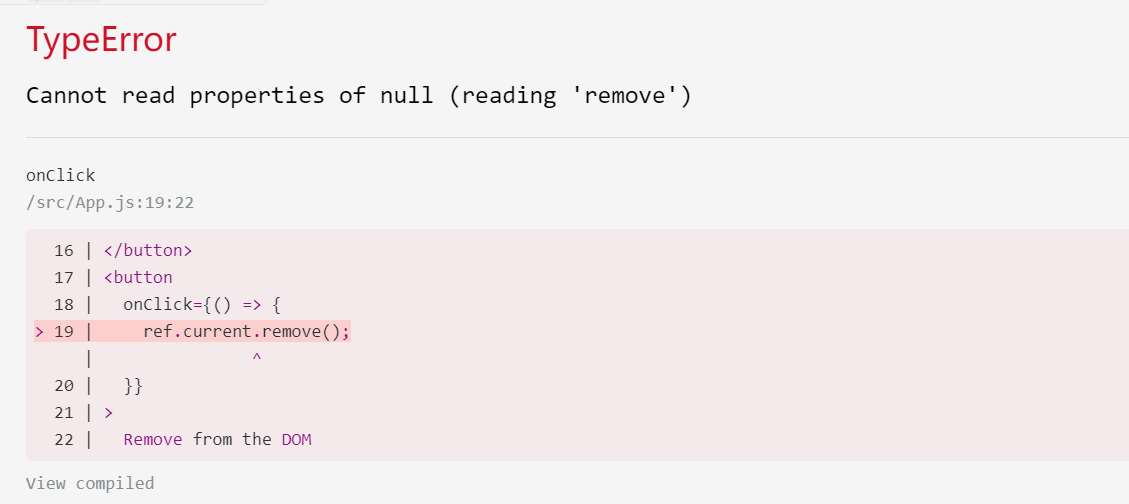
This is the result of the runaway situation caused by using Ref to manipulate the DOM.
How to limit runaway
Now the question arises, since it is called out of control, it is React can not control, so how to limit the loss of control?
In React, components can be divided into:
- Low-order components
- High-order components
Low-order components are those that are wrapped based on the DOM, such as the following components, which are wrapped directly based on input nodes.
In lower-order components, it is possible to point the ref directly to the DOM.
function MyInput(props) {
  const ref = useRef(null)
  return <input ref={ref} {...props} />
}Higher-order components are those that are based on lower-order component wrappers, such as the following Form component, based on the Input component wrapper.
function Form() {
  return (
    <>
      <MyInput />
    </>
  )
}Higher-order components cannot point ref directly to the DOM. This restriction keeps the scope of ref runaway within a single component, and there will be no runaway ref across components.
Take the example in the document, if we want to click a button in the Form component to operate the input focus.
function MyInput(props) {
  return <input {...props} />
}

function Form() {
  const inputRef = useRef(null)

  function handleClick() {
    inputRef.current.focus()
  }

  return (
    <>
      <MyInput ref={inputRef} />
      <button onClick={handleClick}>input聚焦</button>
    </>
  )
}When clicked, an error is reported as follows.
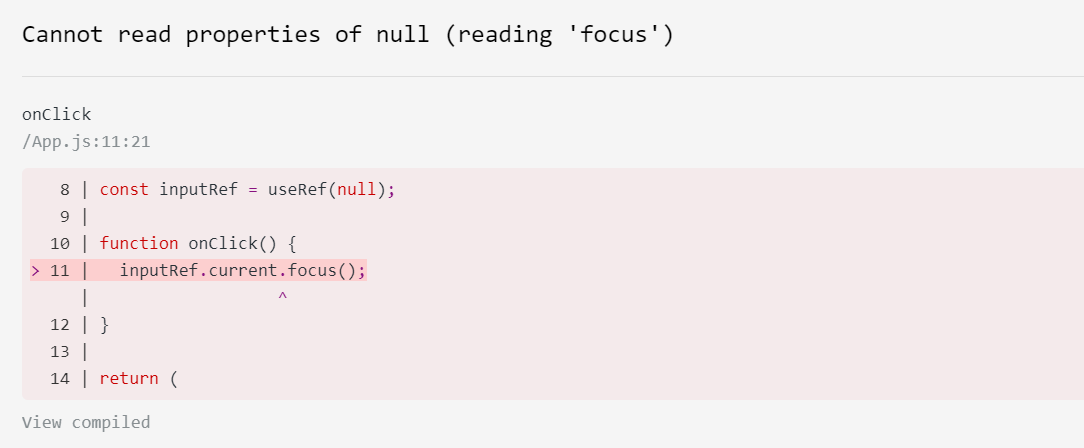
This is because passing a ref to MyInput in the Form component fails, inputRef.current does not point to the input node.
The reason for this is that React does not support passing refs across components by default, as mentioned above, in order to keep the scope of refs out of control within a single component.
Artificially removing the restriction
If you must remove this restriction, you can use the forwardRef API to explicitly pass the ref.
const MyInput = forwardRef((props, ref) => {
  return <input {...props} ref={ref} />
})

function Form() {
  const inputRef = useRef(null)

  function handleClick() {
    inputRef.current.focus()
  }

  return (
    <>
      <MyInput ref={inputRef} />
      <button onClick={handleClick}>Focus the input</button>
    </>
  )
}With the use of forwardRef it is possible to pass ref across components.In the example, we pass inputRef from Form across components to MyInput and associate it with input.
The intent of forwardRef is clear: since the developer manually calls forwardRef to break the restriction that prevents a runaway ref, he should know what he is doing and should take the corresponding risk himself.
Also, with the presence of forwardRef, it is easier to locate the error after a ref-related error occurs.
useImperativeHandle
In addition to restricting the passing of ref across components, there is another measure to prevent ref from getting out of control, and that is useImperativeHandle.
Since refs get out of control because they use DOM methods that shouldn't be used (like appendChild), I can restrict refs to only have methods that can be used.
Modifying our MyInput component with useImperativeHandle.
const MyInput = forwardRef((props, ref) => {
  const realInputRef = useRef(null)
  useImperativeHandle(ref, () => ({
    focus() {
      realInputRef.current.focus()
    },
  }))
  return <input {...props} ref={realInputRef} />
})Now, the Form component can only fetch the following data structure through inputRef.current:
{
  focus() {
    realInputRef.current.focus();
  },
}It eliminates the situation where the developer takes the DOM by ref and then executes the API that should not be used, and the ref gets out of control.
Summary
Normally, the use of ref is relatively rare, and he exists as an escape hatch.
To prevent misuse/abuse that leads to ref getting out of control, React restricts that by default, ref cannot be passed across components.
To break this restriction, forwardRef can be used.
To reduce the misuse of ref on DOM, you can use useImperativeHandle to restrict the data structure passed by ref.